Introduction: Razer Gives Its Basilisk Gaming Mouse a New Generation
A gaming mouse is no longer just a device for moving a cursor. For many players, it is an essential part of their gaming setup, influencing comfort, accuracy, and how quickly they can react during a match.
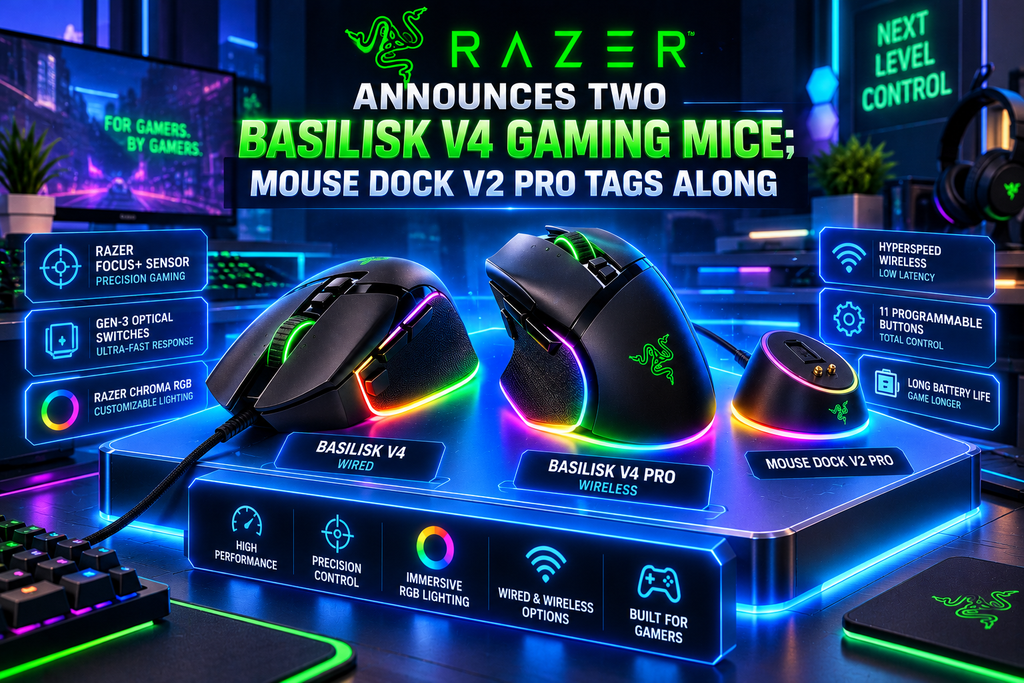
That is why the news that Razer Announces Two Basilisk V4 Gaming Mice; Mouse Dock V2 Pro Tags Along is worth a closer look. Announced on October 8, 2026, the new lineup introduces the Razer Basilisk V4 Pro and Basilisk V4 HyperSpeed, with a redesigned charging dock arriving alongside them.https://pangeeks.com/wp-admin/post.php?post=385&action=edithttps://pangeeks.com/wp-admin/post.php?post=385&action
Both mice retain the Basilisk family’s ergonomic approach and customisable controls, but they target different budgets and performance expectations. The Pro model is designed for enthusiasts who want advanced hardware and extensive customisation, while the HyperSpeed version offers a more accessible entry point.
The new Mouse Dock V2 Pro completes the announcement with magnetic charging, an integrated high-speed wireless transceiver, and RGB lighting.
Here is what gamers should know about the new devices, their specifications, pricing, and which model may be the better fit.
Razer Basilisk V4 Lineup: What’s New?
Razer’s Basilisk series has traditionally appealed to gamers who want a comfortable mouse with multiple programmable buttons rather than an ultra-minimal design.
The V4 generation continues that philosophy, but the two models approach it differently.
Razer Basilisk V4 Pro: A premium wireless mouse with a 50,000 DPI-class sensor, 14 customisable controls, and support for up to 8,000Hz polling.
Razer Basilisk V4 HyperSpeed: A more affordable wireless option with a 33,000 DPI-class sensor, 12 customisable controls, and longer advertised battery life than many everyday gaming mice.
Razer Mouse Dock V2 Pro: A magnetic charging dock that also incorporates an 8,000Hz wireless transceiver for compatible devices.
The announcement represents a broader strategy: give gamers a choice between high-end performance and a less expensive model without abandoning the familiar Basilisk shape.
For the official announcement, visit the Razer Newsroom.
- Razer Basilisk V4 Pro: The Flagship Gaming Mouse
The Basilisk V4 Pro sits at the top of the new range. It combines an ergonomic design with advanced tracking, a large number of programmable controls, and extensive connectivity options.
Focus Pro 50K Optical Sensor Gen-3
The Pro model features Razer’s Focus Pro 50K Optical Sensor Gen-3, with a maximum sensitivity of 50,000 DPI.
DPI measures how far the pointer moves in relation to physical mouse movement. A higher maximum DPI provides more adjustment flexibility, but it does not automatically make a mouse more accurate or make a player better.
Many competitive gamers prefer lower sensitivity because it allows more controlled movements. Others prefer higher sensitivity for fast turns or large displays.
The real advantage is having a wide range of settings available so players can choose what feels natural.
Razer also specifies tracking performance of up to 930 inches per second (IPS) and 90G acceleration for the Pro model.
Up to 8,000Hz Polling
One of the headline features is support for up to 8,000Hz polling in both wired and supported wireless modes.
Polling rate describes how frequently a mouse reports its position to the computer. At 1,000Hz, it reports approximately every millisecond; at 8,000Hz, that interval falls to about 0.125 milliseconds.
This can reduce input-reporting latency, but the practical benefit depends on the game, computer hardware, display refresh rate, and the player’s sensitivity to latency.
For casual gaming, the difference may be difficult to notice. Competitive players with high-refresh-rate monitors may be more interested in it.
Fourteen Customisable Controls
The Basilisk V4 Pro offers 14 customisable controls, including additional buttons and an adjusted trigger layout intended to improve accessibility.
These controls can be useful for assigning abilities, switching equipment, activating macros, or performing repetitive actions without reaching for the keyboard.
The mouse also introduces the HyperScroll Tilt Wheel Gen-2, which supports different scrolling behaviours. Its tactile modes provide more controlled movement, while free-spin mode is useful for moving rapidly through long pages or inventories.
Smart-Reel can automatically switch scrolling behaviour based on scroll speed, and software-based virtual acceleration provides further customisation.
These features are not only useful in games. They can also help with spreadsheets, editing software, browsing, and other desktop tasks.
Optical Switches and RGB Lighting
Razer says the Pro uses Optical Mouse Switches Gen-4 rated for up to 100 million clicks.
Optical switches use light-based detection rather than relying solely on traditional electrical contact. Their design can help reduce certain contact-related issues, although durability in real-world use still depends on the complete product and how it is handled.
The mouse also includes seven-zone Razer Chroma RGB lighting with full underglow. Users can customise the lighting to match other compatible peripherals.
For gamers who enjoy a coordinated desk setup, the lighting adds visual appeal. For players who prioritise battery life or a simple appearance, it may be a feature to reduce or disable.
- Razer Basilisk V4 HyperSpeed: A More Affordable Alternative
Not everyone needs the most advanced sensor or every premium feature. The Basilisk V4 HyperSpeed is designed for users who want the core Basilisk experience at a lower price.
It weighs 94 grams and includes the Focus X 33K Optical Sensor Gen-3, along with 12 customisable controls.
The mouse also supports a four-way tilt wheel with tactile and free-spin scrolling modes, making it useful for gaming and everyday productivity.
How Does It Differ From the Pro?
The HyperSpeed model has a lower maximum sensor sensitivity and fewer customisable controls. It is also positioned below the Pro in terms of advanced wireless performance and features.
However, a 33,000 DPI maximum is already more than enough for most players. The more meaningful questions are whether the mouse feels comfortable, tracks consistently, and provides the right number of buttons for your games.
Razer advertises up to 140 hours of battery life over HyperSpeed Wireless and up to 225 hours over Bluetooth.
That makes the HyperSpeed a practical option for users who want wireless convenience without frequently charging their mouse.
- Basilisk V4 Pro vs Basilisk V4 HyperSpeed
The table below summarises the key differences announced by Razer.
Feature
Basilisk V4 Pro
Basilisk V4 HyperSpeed
Positioning
Premium flagship
More affordable wireless model
Weight
Lighter than its predecessor; exact figure varies by configuration
94g
Optical sensor
Focus Pro 50K Gen-3
Focus X 33K Gen-3
Maximum sensitivity
50,000 DPI
33,000 DPI
Customisable controls
14
12
Polling rate
Up to 8,000Hz
Check the model’s official specifications
Scroll wheel
HyperScroll Tilt Wheel Gen-2
Four-way tilt wheel
Battery over wireless
Up to 200 hours at 1,000Hz
Up to 140 hours
Battery over Bluetooth
Up to 275 hours
Up to 225 hours
Malaysia starting price
RM699
RM479
Specifications and battery figures are manufacturer claims. Battery life depends on connection type, polling rate, lighting, and usage. See the Basilisk V4 Pro listing and Basilisk V4 HyperSpeed listing for official product information.
Which Mouse Should You Choose?
Choose the Basilisk V4 Pro if you want the most advanced sensor, high polling rates, additional controls, and more extensive connectivity.
Choose the Basilisk V4 HyperSpeed if you prefer to spend less, want a wireless ergonomic mouse, and do not need every flagship feature.
One important point: a higher DPI number does not automatically translate into better gameplay. Comfort, consistent tracking, grip style, and sensible sensitivity settings usually matter more than chasing the biggest specification.
- Razer Mouse Dock V2 Pro: More Than a Charging Stand
The Mouse Dock V2 Pro is one of the most interesting parts of the launch because it combines charging with wireless connectivity.
Instead of plugging a cable into the mouse whenever its battery runs low, users can place a compatible mouse on the dock’s magnetic charging system.
This creates a simple routine: finish playing, return the mouse to the dock, and leave it ready for the next session.
Integrated 8,000Hz Wireless Transceiver
The dock incorporates an 8,000Hz transceiver for compatible Razer HyperSpeed Wireless Gen-2 devices.
This means it can serve as more than a charging accessory. It can also help provide the high-speed wireless connection supported by compatible mice.
The dock further supports compatible Razer keyboards and mice through HyperSpeed Multi-Device functionality. Using supported peripherals with a shared receiver can reduce the number of dongles occupying USB ports.
RGB Lighting and Desk Organisation
The Mouse Dock V2 Pro features eight-zone Chroma RGB underglow, a charging status indicator, and an anti-slip base.
The lighting can complement a Razer gaming setup, while the stable base helps keep the dock in place during everyday use.
Still, the dock is an optional accessory rather than an essential purchase for everyone. Gamers who are comfortable charging a mouse through a cable may prefer to save the extra money.
Another detail worth checking before buying: Razer’s Malaysian announcement reports that the dock’s standalone package does not include the wireless charging puck, while the bundles include it. Check the exact package contents for your region.
Official details are available on the Mouse Dock V2 Pro product page.
- Pricing and Availability
According to Malaysian launch coverage, the starting prices are:
Product
Malaysia starting price
Razer Basilisk V4 Pro
RM699
Razer Basilisk V4 HyperSpeed
RM479
Razer Mouse Dock V2 Pro, sold separately
RM299
Basilisk V4 Pro with dock bundle
RM960
Basilisk V4 HyperSpeed with dock bundle
RM649
These prices were reported by Lowyat.NET following the announcement. Prices, bundles, and availability may vary by market and retailer.
The Pro model is the more expensive option, but the price difference reflects its more advanced sensor, additional controls, and high-speed wireless features.
The HyperSpeed is more appealing for buyers who want a capable wireless gaming mouse without paying for specifications they may never use.
For buyers in India, confirm local availability, warranty coverage, and the final price with an authorised seller before ordering. Malaysian prices should not be treated as direct Indian retail prices.
- What This Launch Means for Gamers
The Basilisk V4 lineup highlights an important trend in gaming peripherals: manufacturers are trying to make one device work across several parts of daily life.
A mouse may be used for a competitive match in the evening, work during the day, and content creation on weekends. Programmable buttons, adjustable scrolling, multiple connectivity modes, and ergonomic design can be valuable across all these activities.
The Pro model pushes this approach toward the enthusiast market, where users may appreciate high polling rates and extensive customisation.
The HyperSpeed model focuses on the essentials, while the Mouse Dock V2 Pro attempts to make charging and device connectivity less inconvenient.
There are trade-offs, of course. Extra controls can take time to learn, RGB lighting can affect battery consumption, and higher polling rates may offer diminishing returns for some users.
The best choice is therefore not necessarily the mouse with the longest feature list. It is the one whose shape, controls, and performance match your everyday needs.
Frequently Asked Questions
When did Razer announce the Basilisk V4 series?
Razer announced the Basilisk V4 Pro, Basilisk V4 HyperSpeed, and Mouse Dock V2 Pro on October 8, 2026.
What is the main difference between the Basilisk V4 Pro and HyperSpeed?
The Pro offers a more advanced 50K-class sensor, 14 customisable controls, and up to 8,000Hz polling. The HyperSpeed uses a 33K-class sensor, has 12 customisable controls, and costs less.
Does the Basilisk V4 Pro support wireless charging?
It supports compatible wireless charging accessories, including the Mouse Dock V2 Pro and Razer’s HyperFlux V2 system.
How long does the battery last?
Razer advertises up to 200 hours for the Pro over HyperSpeed Wireless at 1,000Hz and up to 275 hours over Bluetooth. The HyperSpeed is rated for up to 140 hours over HyperSpeed Wireless and 225 hours over Bluetooth. Actual results vary with settings and usage.
Is the Mouse Dock V2 Pro worth buying?
It may be worthwhile if you want convenient magnetic charging and the integrated high-speed transceiver. If you prefer charging by cable and do not need the dock’s extra connectivity, buying the mouse alone may offer better value.
Conclusion: Two Mice, Two Different Priorities
The Razer Basilisk V4 Pro, Basilisk V4 HyperSpeed, and Mouse Dock V2 Pro form a useful expansion of Razer’s gaming peripheral lineup.
The Pro is aimed at enthusiasts who want extensive controls, advanced tracking, and high polling rates. The HyperSpeed offers a less expensive alternative with a capable sensor, programmable buttons, and long advertised battery life. The dock adds convenient charging and a cleaner wireless setup for compatible devices.
Neither mouse is automatically the best choice for every gamer. Your grip style, preferred games, budget, and tolerance for extra features should guide the decision.
Our verdict: The Basilisk V4 Pro is the model to watch for feature-focused gamers, while the Basilisk V4 HyperSpeed looks like the more practical option for buyers who want wireless gaming without spending as much. The Mouse Dock V2 Pro is a useful extra, but its value depends on whether you will actually use its charging and connectivity features.